

Our first decision was supposed to be which model to load. The preflight changed the order: we needed to establish what an eight-GPU H200 NVL server could actually move between its GPUs. The answer was two fast four-GPU islands, with a cross-socket path that initially failed correctness checks. Until that path worked, a model benchmark would have mixed software behaviour with a broken machine configuration.
What we were given
One HPE server, made available for a short campaign: eight NVIDIA H200 NVL cards, two Intel Xeon 6747P sockets (192 threads), 2 TB of RAM, a 440 GB boot disk and two 5.8 TB NVMe drives. The H200 NVL is the PCIe version of the H200, with 141 GB of HBM3e per card and NVLink bridges that join up to four cards [S02]. Before installing anything, we asked the machine what it was:
$ nvidia-smi --query-gpu=index,name,memory.total,driver_version,pcie.link.gen.current,pcie.link.width.current --format=csv
index, name, memory.total [MiB], driver_version, pcie.link.gen.current, pcie.link.width.current
0, NVIDIA H200 NVL, 143771 MiB, 595.91.07, 5, 16
...                                   (GPUs 1-7 identical)
7, NVIDIA H200 NVL, 143771 MiB, 595.91.07, 5, 16
$ lscpu | grep -E "Model name|Socket|NUMA node[0-9]"
Model name:          Intel(R) Xeon(R) 6747P
Socket(s):           2
NUMA node0 CPU(s):   0-23,96-119
NUMA node1 CPU(s):   24-47,120-143
NUMA node2 CPU(s):   48-71,144-167
NUMA node3 CPU(s):   72-95,168-191
$ free -g
               total        used        free      shared  buff/cache   available
Mem: 2003 72 1810 0 129 1931The driver stack
The NVIDIA driver came from Ubuntu's packaged open kernel module. On top of it we have the container toolkit (every engine runs in Docker) and DCGM, which we added for real GPU-activity counters, because nvidia-smi's "GPU-Util" only says that some kernel was running [S22] [S23]. DCGM was installed from NVIDIA's Ubuntu 26.04 repository after adding cuda-keyring.
$ grep PRETTY /etc/os-release; uname -r
PRETTY_NAME="Ubuntu 26.04.1 LTS"
7.0.0-38-generic
$ nvidia-smi | sed -n 3p
| NVIDIA-SMI 595.91.07              Driver Version: 595.91.07      CUDA Version: 13.2     |
$ dpkg -l | grep -E "nvidia-driver-595|nvidia-container-toolkit |datacenter-gpu-manager-4-c|cuda-keyring" | awk '{print $2, $3}'
cuda-keyring 1.1-1
datacenter-gpu-manager-4-core 1:4.7.0-2
datacenter-gpu-manager-4-cuda13 1:4.7.0-2
...                                     (4 more cuda13 sub-packages, same version)
nvidia-container-toolkit 1.20.1-1
nvidia-driver-595-server-open 595.91.07-0ubuntu0.26.04.2
$ systemctl is-active nvidia-dcgm; dcgmi --version
active
dcgmi  version: 4.7.0
$ docker info --format "root={{.DockerRootDir}} runtimes={{range $k,$v := .Runtimes}}{{$k}} {{end}}"
root=/mnt/data/docker runtimes=io.containerd.runc.v2 nvidia runcStorage: one RAID0 instead of two disks
Storage was the first capacity decision. The order sheet listed two 7 TB drives; the node reported two raw 5.8 TB NVMe disks. With several terabytes of checkpoints planned, 766 GB for GLM-5.3 and 950 GB for DeepSeek-V4-Pro, we combined them as an XFS RAID0 at /mnt/data. We also moved Docker’s data-root there so engine images would not consume the 440 GB boot disk. This gave the campaign one large, fast scratch volume; RAID0 provides no drive-failure redundancy, so the array was not an archive strategy.
# setup (as run)
$ mkfs.xfs -q -f /dev/md127
$ mdadm --detail --scan >> /etc/mdadm/mdadm.conf
# /etc/fstab:  UUID=<uuid> /mnt/data xfs defaults,noatime,nofail 0 2
$ cat /proc/mdstat
md127 : active raid0 nvme1n1[0] nvme2n1[1]
      12502181888 blocks super 1.2 512k chunks
$ cat results/preflight/fio_summary.txt
/mnt/data (md127 RAID0 2xNVMe) write GB/s = 5.99
/mnt/data (md127 RAID0 2xNVMe) read GB/s = 13.49
/mnt/data (md127 RAID0 2xNVMe) randread1m GB/s = 13.49Network: stop waiting for cables that aren't there
Every boot spent two minutes in systemd-networkd-wait-online, waiting for four network ports with nothing plugged in. We rewrote the netplan file so only the public port matters (the unused links became optional: true) and applied it under a 90-second auto-rollback, so a mistake couldn't lock us out of a remote machine.
# before: every boot waited 2 minutes
$ journalctl -u systemd-networkd-wait-online | grep -i timeout
Oct 09 18:04:00 ubuntu systemd-networkd-wait-online[6890]: Timeout occurred while waiting for network connectivity.
# the change, with a rollback guard
$ cp -a /etc/netplan/00-installer-config.yaml /root/00-installer-config.yaml.bak
$ netplan generate
$ nohup bash -c "sleep 90; [ -f /root/net_ok ] || { cp -a /root/00-installer-config.yaml.bak /etc/netplan/00-installer-config.yaml; netplan apply; }" &
$ netplan apply
$ touch /root/net_ok          # from a fresh SSH session: cancel the rollback
# after: wait-online only waits for the public port
ExecStart=/lib/systemd/systemd-networkd-wait-online --any --dns -o routable -i enP1s3f1np1Downloads were another shared resource to budget. During the original campaign, a single Hugging Face repository reached 4.70 Gbit/s (588 MB/s) in our probe. The historical setup below first applied a 2 Gbit/s cap and later raised it to 5 Gbit/s. Those commands record what happened during that run, not a recommendation to consume the link without a limit. The current follow-up work uses the separately requested 2 Gbit/s ceiling.
$ tc qdisc add dev enP1s3f1np1 handle ffff: ingress
$ tc filter add dev enP1s3f1np1 parent ffff: protocol all prio 1 u32 match u32 0 0 police rate 2gbit burst 4mb drop flowid :1
# measured: ~2.5 Gbit/s at the 2gbit cap; ~5.96 Gbit/s after raising it to 5gbitThe shape of the machine
The topology output set the boundary for every later parallelism experiment. GPUs 0-3 form one fully connected NVLink group; GPUs 4-7 form another. NV6 means six bonded NVLink connections inside each group. Traffic between the groups crosses the CPU/socket interconnect instead. Eight cards in one chassis therefore do not behave like an eight-GPU NVSwitch fabric: keeping a collective inside a quad and sending it across both sockets are different experiments. [S01] [S03]
Eight GPUs. Two communication domains.
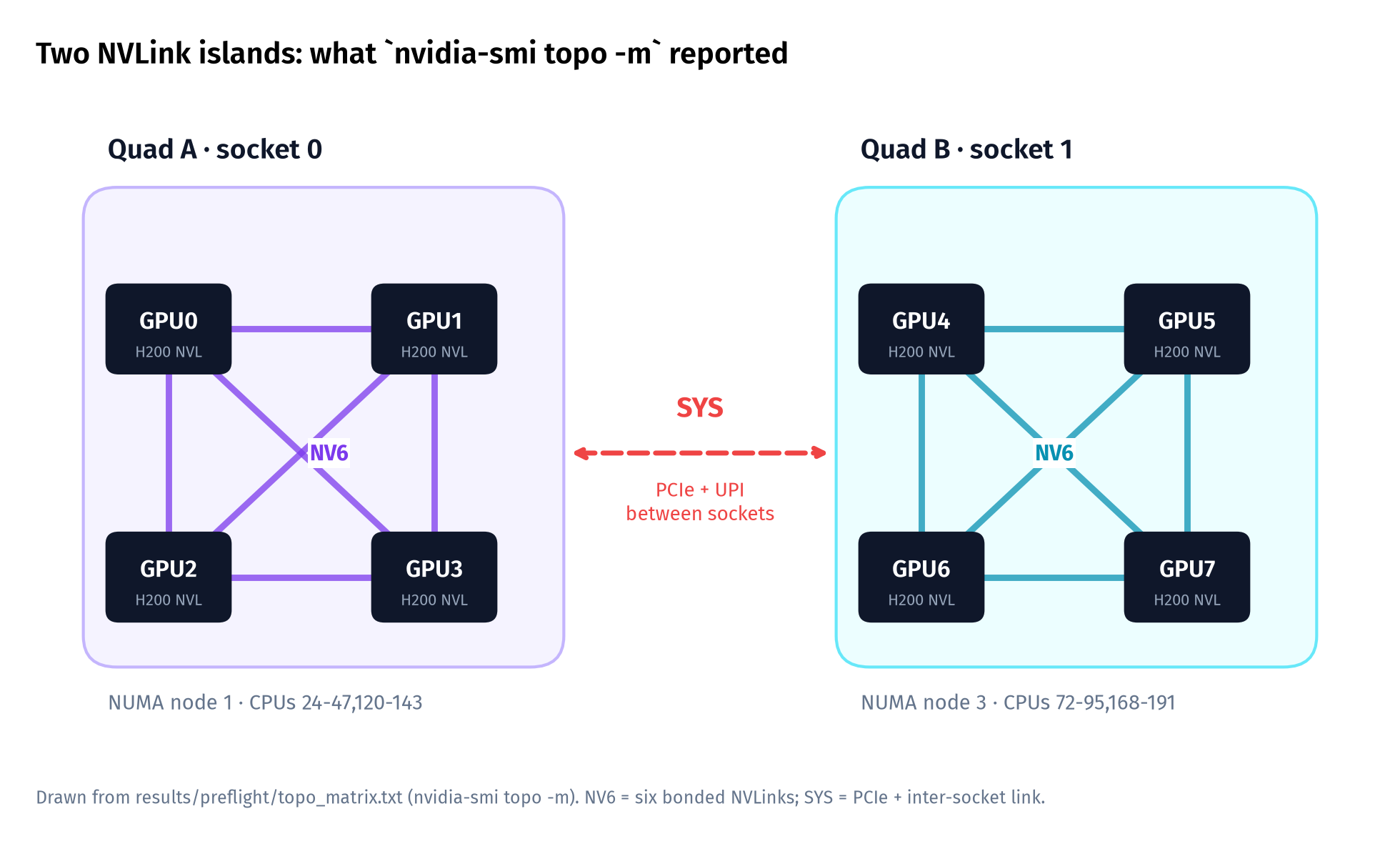
nvidia-smi topo -m matrix. Each GPU in a quad links to the other three with NV6; nothing links the quads except PCIe and the inter-socket link. Open full-size chart$ nvidia-smi topo -m (GPU rows only)
GPU0 GPU1 GPU2 GPU3 GPU4 GPU5 GPU6 GPU7 CPU Affinity NUMA Affinity
GPU0 X NV6 NV6 NV6 SYS SYS SYS SYS 24-47,120-143 1
GPU1 NV6 X NV6 NV6 SYS SYS SYS SYS 24-47,120-143 1
GPU2 NV6 NV6 X NV6 SYS SYS SYS SYS 24-47,120-143 1
GPU3 NV6 NV6 NV6 X SYS SYS SYS SYS 24-47,120-143 1
GPU4 SYS SYS SYS SYS X NV6 NV6 NV6 72-95,168-191 3
GPU5 SYS SYS SYS SYS NV6 X NV6 NV6 72-95,168-191 3
GPU6 SYS SYS SYS SYS NV6 NV6 X NV6 72-95,168-191 3
GPU7 SYS SYS SYS SYS NV6 NV6 NV6 X 72-95,168-191 3The surprise: the bridge between the islands was broken
We ran NVIDIA’s nvbandwidth and nccl-tests before loading a model, checking both data integrity and collective bandwidth. The within-quad results looked healthy. Cross-socket peer copies did not: the pattern check failed, and the kernel recorded DMAR faults. That combination moved the investigation below the inference engine. Changing a serving flag would not explain or repair corrupted peer traffic.
$ nvbandwidth -t device_to_device_memcpy_read_ce
Running device_to_device_memcpy_read_ce.
 Invalid value when checking the pattern at 0x74f260000000
 Current offset : 69440
ASSERT in expression h_errorFlag == 0 in void memcmpPatternHelper(...)
$ dmesg | grep DMAR
DMAR: [DMA Write NO_PASID] Request device [b2:00.0] ... SM: Present bit in first-level paging entry is clear[b2:00.0] is GPU 0. The Intel IOMMU was running in translated mode, and it rejected direct GPU-to-GPU writes between the sockets. NCCL didn't fail. It quietly routed cross-socket traffic through host shared memory (via SHM in its debug log), and all eight GPUs together managed only 61 GB/s of all_reduce, about a fifth of what one quad does on its own.
$ all_reduce_perf -b 8M -e 8G -f 2 -g 4        # GPUs 0-3 (one quad)
  8589934592    2147483648  float    sum    -1  38251.5  224.56  336.85       0
$ all_reduce_perf -b 8M -e 8G -f 2 -g 8        # all 8 GPUs
  8589934592    2147483648  float    sum    -1   246201   34.89   61.06       0
$ grep "via SHM" nccl_all8.txt | head -2
NCCL INFO Channel 01 : 7[7] -> 0[0] via SHM/direct/direct
NCCL INFO Channel 00 : 3[3] -> 4[4] via SHM/direct/directThe fix: IOMMU passthrough, then one reboot
NCCL's own troubleshooting guide covers this case: with the IOMMU translating addresses, PCIe peer-to-peer traffic can fail or slow down, and passthrough mode avoids it NCCL GPU troubleshooting guide. We backed up grub, added intel_iommu=on iommu=pt, and rebooted at about 04:00 IST on Saturday. The reboot also cleared the download policer from the previous section.
$ diff /etc/default/grub.bak.20261009222613 /etc/default/grub
< GRUB_CMDLINE_LINUX_DEFAULT=""
> GRUB_CMDLINE_LINUX_DEFAULT="intel_iommu=on iommu=pt"
$ update-grub && reboot
$ cat /proc/cmdline
BOOT_IMAGE=/boot/vmlinuz-7.0.0-38-generic root=UUID=<uuid> ro intel_iommu=on iommu=pt crashkernel=...
$ dmesg | grep -iE "DMAR: IOMMU enabled|Default domain type"
[    6.483756] DMAR: IOMMU enabled
[   19.735166] iommu: Default domain type: Passthrough (set via kernel command line)
$ dmesg | grep -ciE "DMAR.*fault"
0
$ nvbandwidth -t device_to_device_memcpy_read_ce        (rows 0 and 4)
           0         1         2         3         4         5         6         7
 0       N/A    132.99    132.99    132.99     38.54     38.68     38.22     38.49
4 38.61 38.68 38.52 38.50 N/A 132.99 133.00 133.00Cross-socket copies now work, at 38.5 GB/s one way per GPU pair, against 133 GB/s over NVLink inside a quad. NCCL's default all-8 all_reduce only moved from 61.2 to 64.3 GB/s, because NCCL still preferred shared memory for the hop between sockets. Forcing peer-to-peer at every distance with NCCL_P2P_LEVEL=SYS [S24] lifted all_reduce to 83.1 GB/s peak (+29% over the new default). The same setting made all_to_all, the collective that expert parallelism depends on, collapse from 16.5 to 1.25 GB/s.
$ NCCL_P2P_LEVEL=SYS all_reduce_perf -b 8M -e 8G -f 2 -g 8
  8589934592    2147483648  float    sum    -1   180717   47.53   83.18       0
$ alltoall_perf -b 8M -e 8G -f 2 -g 8                            # default
  8589934592     268435456  float   none    -1   455613   18.85   16.50       0
$ NCCL_P2P_LEVEL=SYS alltoall_perf -b 8M -e 8G -f 2 -g 8
  8589934592     268435456  float   none    -1  6006200    1.43    1.25       0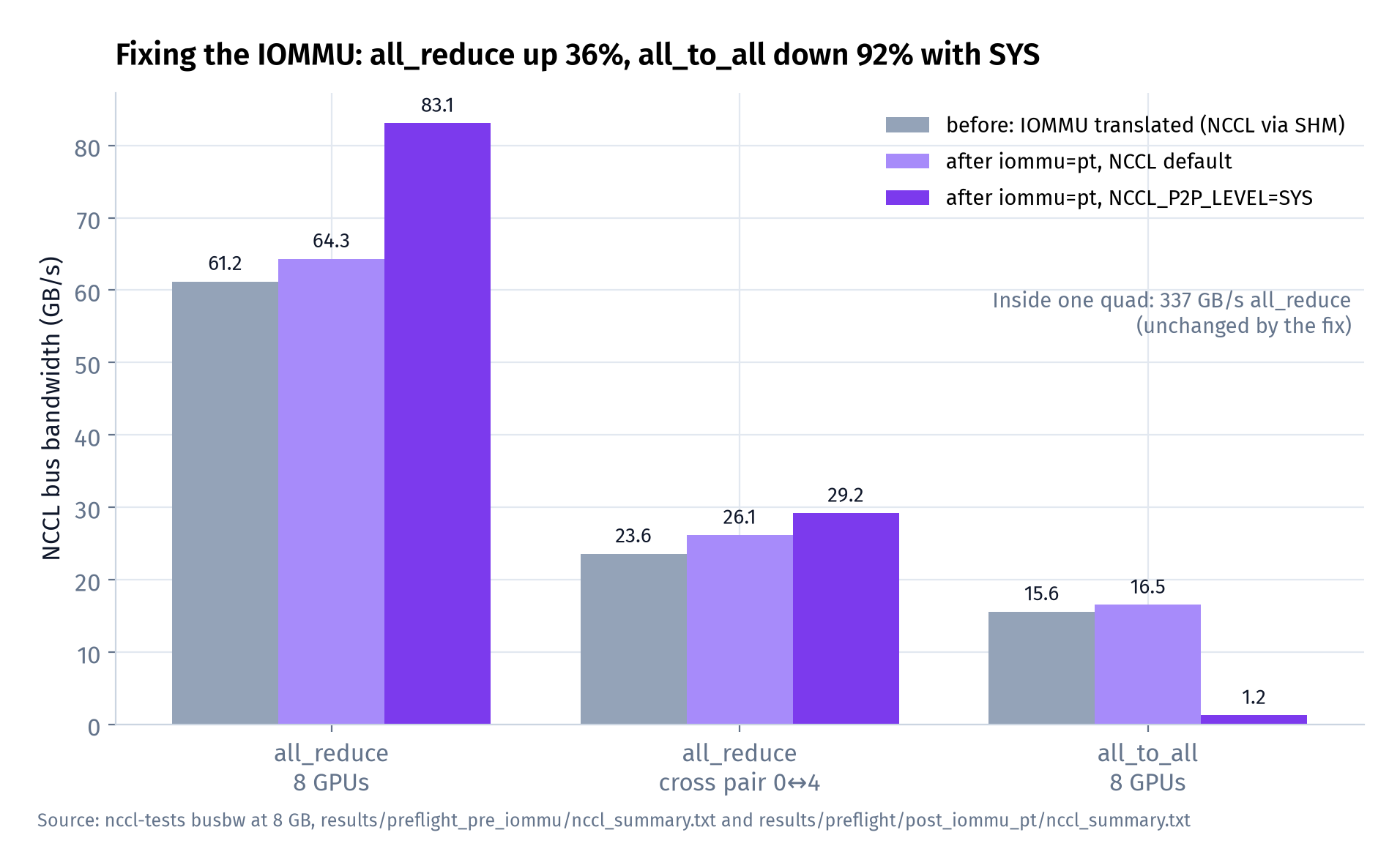
NCCL_P2P_LEVEL=SYS. All-reduce improved with SYS while all-to-all deteriorated; neither result is a physical-link specification or a direct model-throughput measurement. Open full-size chartAn NCCL maintainer explains the asymmetry: with peer-to-peer at the SYS level, all-to-all traffic gets routed in a way that the inter-socket link handles badly [S100]. We took that as a rule for the rest of the campaign: set NCCL_P2P_LEVEL=SYS only for tensor-parallel jobs that span both quads, and never for expert-parallel ones. Our launcher records that choice in every run's launch.json.
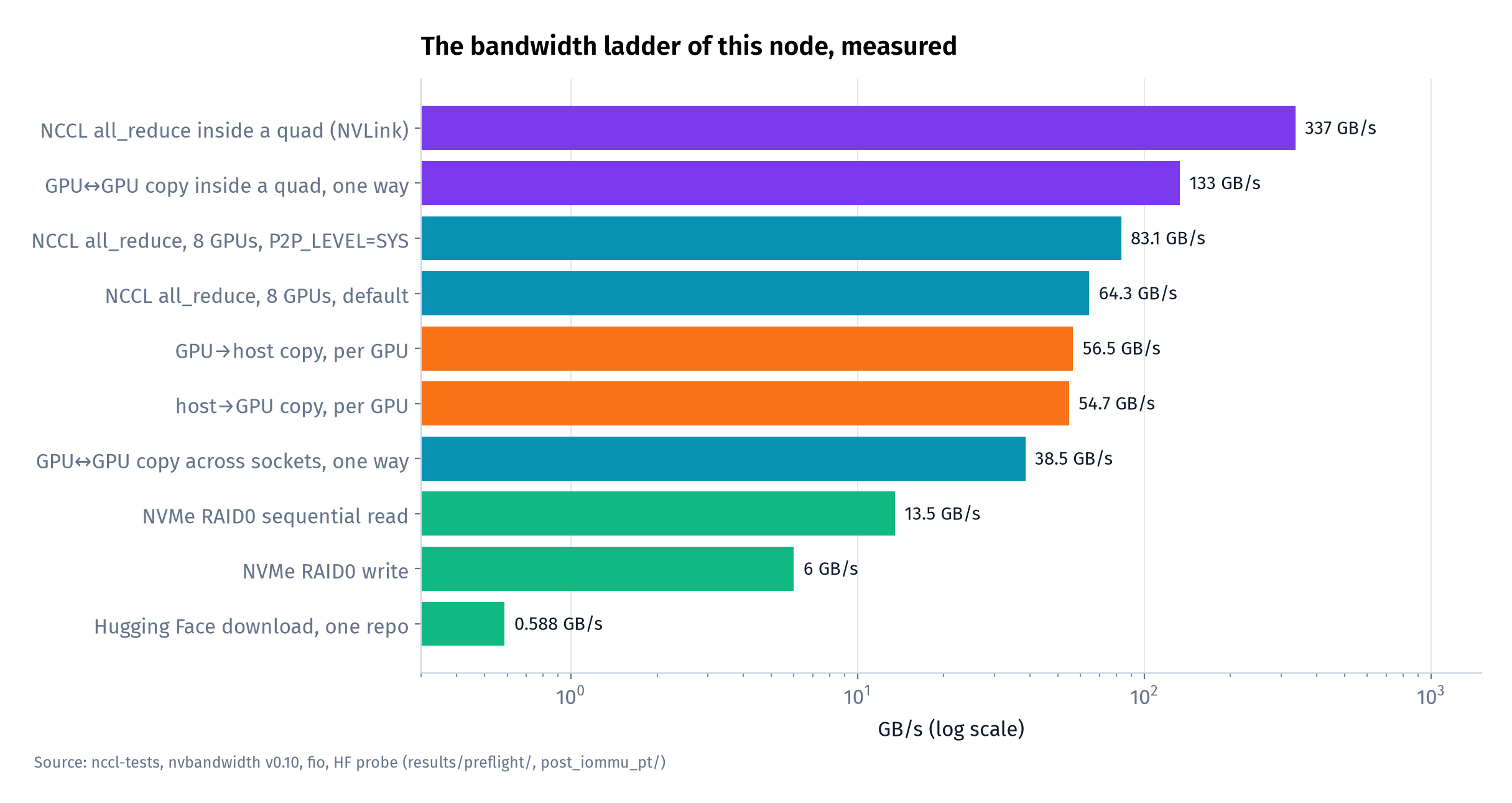
- Use one quad as the first deployment unit. Within-quad
all_reducereached 337 GB/s; the best eight-GPU result was about 83 GB/s. For a model that fits on four GPUs, start with a quad and compare replicas before extending tensor parallelism across sockets. That is a baseline to test, not a rule that eight GPUs can never improve latency or capacity. [S07] - Check the IOMMU before you benchmark anything. NCCL fell back silently. The only signals were a failed
nvbandwidthpattern check and DMAR lines indmesg. - Scope NCCL settings to the communication pattern.
NCCL_P2P_LEVEL=SYSimproved our TP8all_reduceby 29% but reducedall_to_allbandwidth by 92%. We therefore treated it as a per-job choice. The all-reduce result cannot stand in for the expert-routing traffic of an MoE model. - Disk reads at 13.5 GB/s mean a 766 GB checkpoint needs at least 766 / 13.5 ≈ 57 s to stream from the array (an estimate from the formula, not a measured load time). Cold starts get their own post.
Before the first model
With the peer-copy failure repaired and the communication domains measured, we could make the first model experiment interpretable. Part 2 starts with Qwen3.8-27B, small enough for one H200, so we could compare latency and concurrency without making cross-socket collectives a prerequisite.
Sources
Bracketed ids [S..] refer to the campaign bibliography (docs/SOURCES.md). Numbers not attributed to a source are our own measurements on this node.
- [S02] NVIDIA, H200 product page (H200 NVL column)
- [S22] Modal (Charles Frye), GPU utilization guide (blog)
- [S23] NVIDIA, DCGM feature overview: profiling metrics
- [S01] NVIDIA, H200 NVL product brief (PB-12243): NVLink bridge topology guidance
- [S03] NVIDIA, AI Enterprise reference architecture: compute node hardware
- [S24] NVIDIA, NCCL environment variables
- [S100] NVIDIA NCCL, https://github.com/NVIDIA/nccl/issues/1603
- [S07] vLLM project, Parallelism and Scaling (docs)
- NVIDIA, https://docs.nvidia.com/deeplearning/nccl/user-guide/docs/troubleshooting/gpu_troubleshooting.html (NCCL GPU troubleshooting guide)